• Home
  • About
  • Services
  • Bossed Up PH

  • Programs
  • Resources
    • Blog
    • Tools
  • Shop
0

Bossed Up PH

Artificial Intelligence / Freelancing

Canva AI Features to Boss Up Your Design Process | Part 2

November 10, 2025

In our recent blog, we discovered new ways to generate graphics, images, videos, and even websites using Canva AI.

Now, let’s learn about some new ways to improve our design process to make sure that we work efficiently and at the same time, we deliver the best possible design to our clients.

And of course, once again, with the help of AI!

1. Canva Design Advice

Since we’re in the creative field, it is our passion to create.
So, I’m pretty sure you won’t rely on AI to create 100% of your designs, right, Bosses?

But if you want or need someone to critique your design before the client checks it for approval, no need to switch tabs and wait for feedback on your Facebook communities or your go-to design friend.

You don’t have to go back and forth on your Canva board because there’s now a built-in AI right inside the editor.

So, let’s say you’re done with your design.
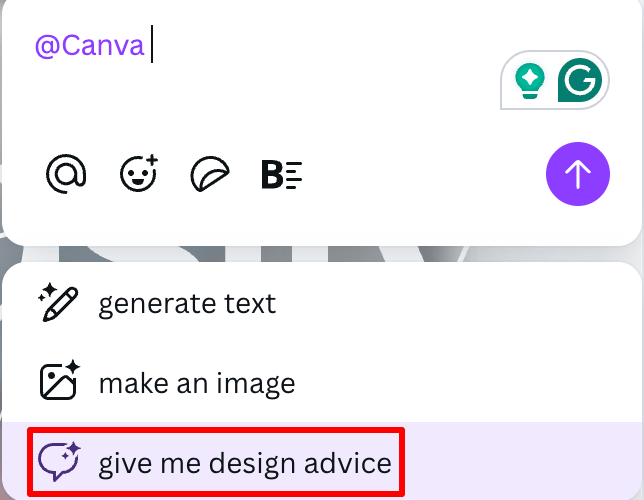
Just find “Ask Canva” in the toolbar and then click ‘give me design advice’.

And just like that…

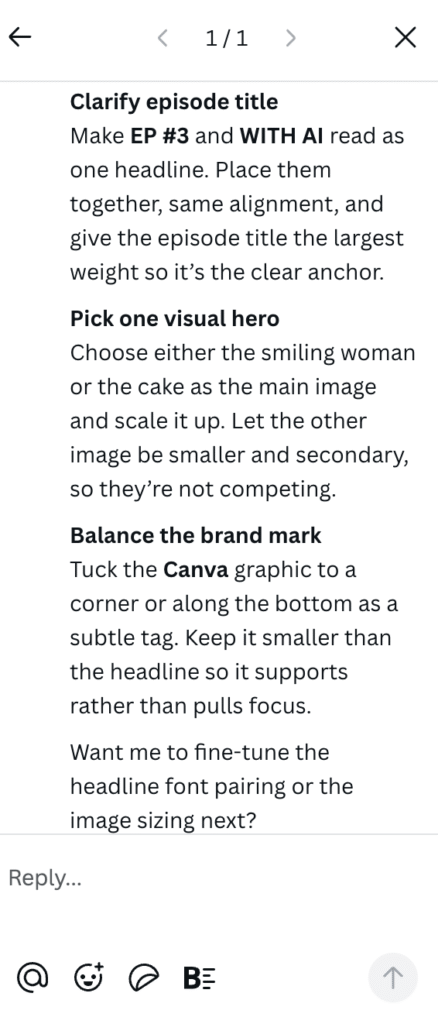
we get detailed instructions on how we can improve the design.

But of course, AI may not always accurately predict the full concept behind what we’re creating, so we still need to decide which suggestions actually fit our design.

2. Magic Edit

Some products don’t need another photoshoot, just some editing magic!

If you’re working with a client, especially in e-commerce, you’ll often need to create product designs in multiple colors to help customers visualize their options.

But what if your client only has one product color available, and the rest will only be produced when there’s an order?

How do you do it if you’re not yet familiar with advanced design tools?

Well, you just need Canva!
Click ‘Edit’ and under Magic Studio, click ‘Magic Edit’
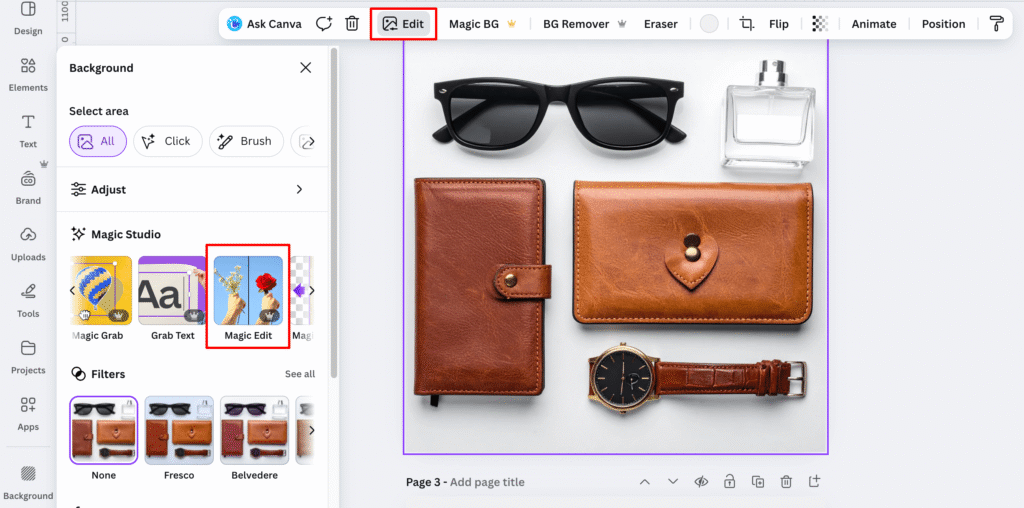
Select the area or object to be edited, either by using a brush or by clicking on it.
And then, just describe what you want to happen with the selected object.
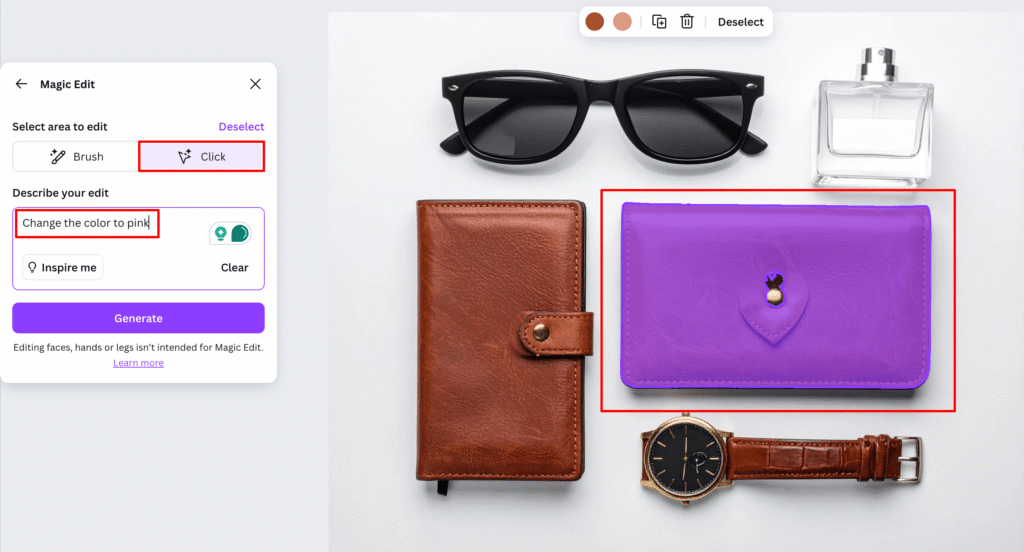

In this example, we want to have another color.
And so…the other wallet became pink!

You can use this feature not just to change colors, but also to replace one object with another or even add new elements to the image!

3. Magic Grab and Grab Text

The real secret to good design? Flexibility.

Because honestly, nothing is more challenging for a designer than not being able to make edits or adjustments.

For example..

You found the perfect photo online for your design, but there’s one problem:
it has text already printed on it.

Yes, not a textbox. It is really in the image. How do you edit it?

Grab Text!

Click ‘Edit’ and under Magic Studio, find ‘Grab Text’
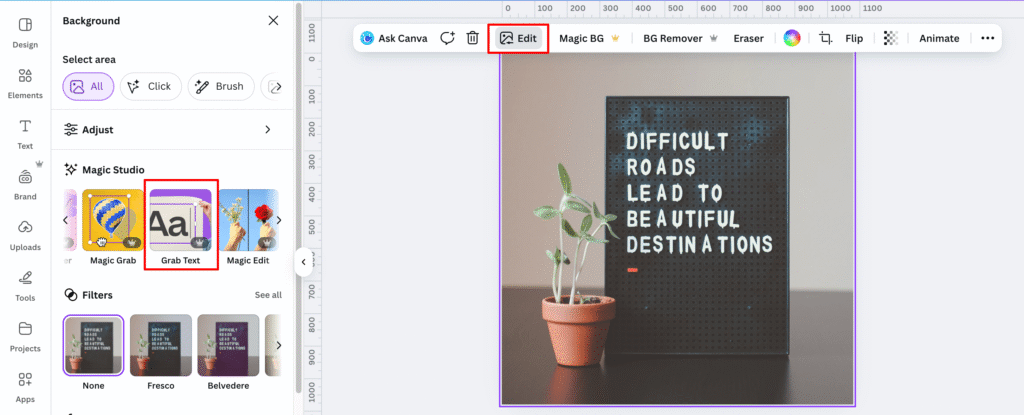
Select the text on the photo and click ‘Grab’
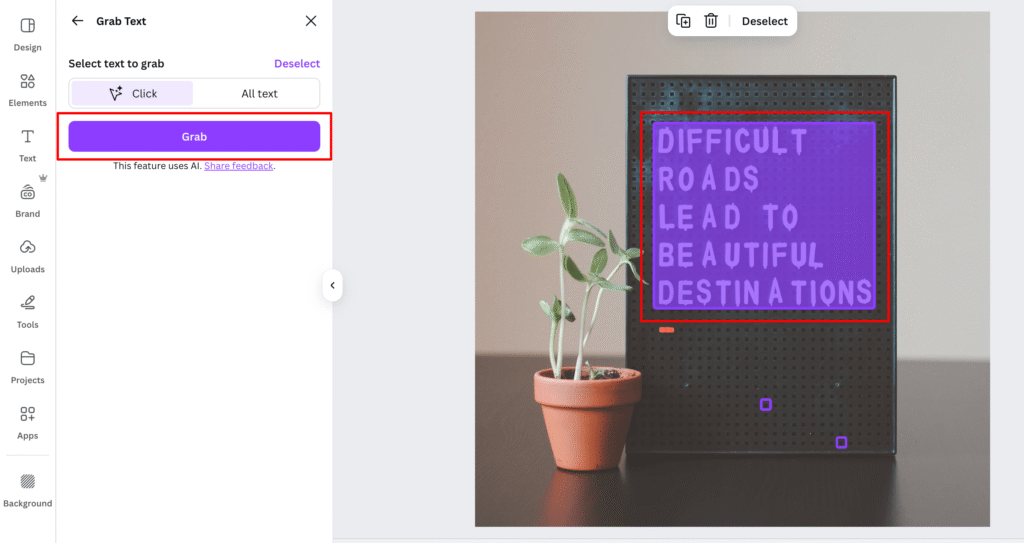
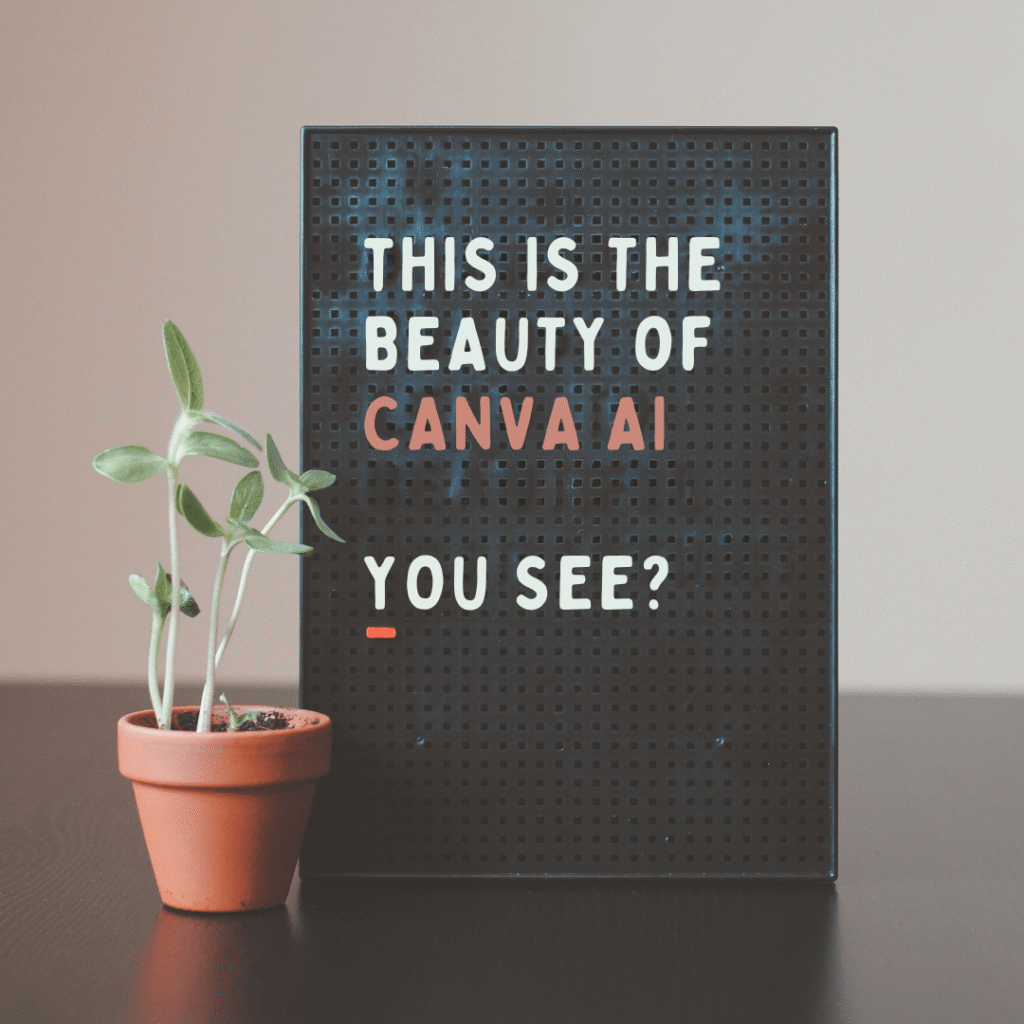
And here we go!

The image is now customizable.
The text becomes editable.

You can do this for mock-ups, signage, posters, event invitations, social media quote posts, and more!

Another example…

You found the perfect photo online for your design, but it has an object you want to move around or simply remove from the photo. How do you do it?

Magic Grab!

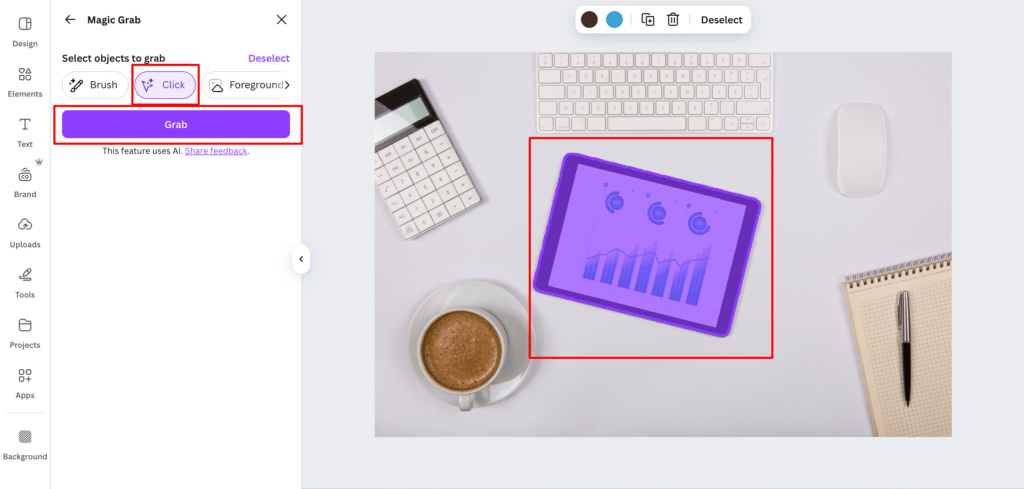
Click ‘Edit’ and under Magic Studio, click ‘Magic Grab‘.
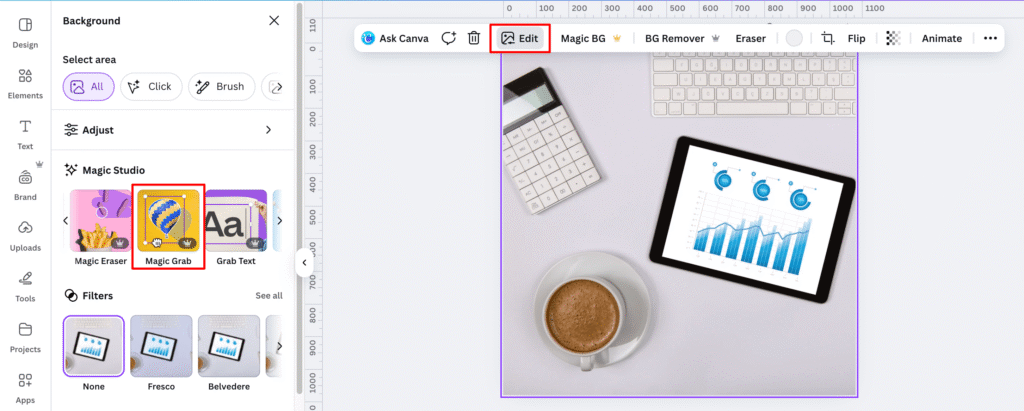
Select which object or objects you want to grab and click ‘Grab’.

And then…from this big tablet in the center, we can scale it smaller and move it to the other side, or just simply remove it!


Back then, designers could only do this using advanced design tools.

And since some freelancers who do not specialize in graphic design may not have enough time to master complex design tools, knowing these CANVA AI FEATURES is really a big deal in their design process.

A total game-changer!

Watch more AI Tips and Video Tutorials

▶︎ CREATE YOUR FREE ACCOUNT IN CANVA

TAGS:best Canva AI tools for freelancersCanva AI design tools for social media managersCanva AI featuresCanva AI for content creatorsCanva AI for freelancersCanva AI tools 2025Canva AI tools every freelancer should knowCanva AI updatesCanva Magic EditCanva Magic Edit and Magic Eraser explainedCanva Magic StudioCanva Magic Studio tutorialCanva Magic WriteCanva new features 2025Canva Text to Videohow to turn text into video using Canva AIhow to use Canva AI features for content creationlatest Canva AI features you need to trystep-by-step guide to Canva Magic Writetop Canva AI tools to boost productivity
Share

You May Also Like

June 24, 2025

VA Basics: Time-Tracking 101

January 23, 2026

5 Beginner-Friendly AI Freelance Jobs

September 15, 2025

The Future of Freelancing: How to Keep Your Job When AI Is Changing the Game?

August 19, 2025

3 Easy Ways to Set Your Rates as a Freelancer

Instagram

Here's a list of AI tools you can explore for each specific task, Bosses!

Save the list 🔖

#aitools #aicontenttools #aiinfreelancing
•
Follow
Here's a list of AI tools you can explore for each specific task, Bosses! Save the list 🔖 #aitools #aicontenttools #aiinfreelancing
4 days ago
View on Instagram |
1/6
Some people think VA work is “just typing.”
It’s not 😅

VA tasks include:
📌 Managing and responding to emails
📌 Scheduling meetings
📌 Handling social media accounts
📌 Doing research and data entry
📌 Organizing files

Basically, you help business owners (clients) save time so they can focus on growing their business.

You don’t need to master everything agad.

For now, as an aspiring VA, just learn the basics of these tasks and understand ano ba talaga ang ginagawa ng isang General VA.

I have a free video where I talked about some of the tasks that I do for my clients.

If you wanna watch it, just comment “VA Tasks” below and it’ll be sent to you agad 💻
•
Follow
Some people think VA work is “just typing.” It’s not 😅 VA tasks include: 📌 Managing and responding to emails 📌 Scheduling meetings 📌 Handling social media accounts 📌 Doing research and data entry 📌 Organizing files Basically, you help business owners (clients) save time so they can focus on growing their business. You don’t need to master everything agad. For now, as an aspiring VA, just learn the basics of these tasks and understand ano ba talaga ang ginagawa ng isang General VA. I have a free video where I talked about some of the tasks that I do for my clients. If you wanna watch it, just comment “VA Tasks” below and it’ll be sent to you agad 💻
1 week ago
View on Instagram |
2/6
Here’s a list of things you can do if wala ka pang experience working online pero kailangan mo ng portfolio.

👉Do the task for your own freelance business and then screenshot your results or screen-record the process, store those sample works sa Google Drive/OneDrive/Dropbox, and share the folder link to your prospect client.

👉 Get feedback from mentors na na-enrollan mo and pwede din magrequest for a certificate. Though mas relevant ang feedback than certificates because you can use it as testimonials. So don’t forget to prioritize finishing the training para mabigyan ka talaga nila ng feedback.

👉 Build your own social media page so they can see your actual output and processes. Think of social media as your free marketing platform, Bosses!

And if you need more ideas on how you can build your online portfolio, just comment “BUP-PORTFOLIO” so I can send you the free guides.
•
Follow
Here’s a list of things you can do if wala ka pang experience working online pero kailangan mo ng portfolio. 👉Do the task for your own freelance business and then screenshot your results or screen-record the process, store those sample works sa Google Drive/OneDrive/Dropbox, and share the folder link to your prospect client. 👉 Get feedback from mentors na na-enrollan mo and pwede din magrequest for a certificate. Though mas relevant ang feedback than certificates because you can use it as testimonials. So don’t forget to prioritize finishing the training para mabigyan ka talaga nila ng feedback. 👉 Build your own social media page so they can see your actual output and processes. Think of social media as your free marketing platform, Bosses! And if you need more ideas on how you can build your online portfolio, just comment “BUP-PORTFOLIO” so I can send you the free guides.
2 weeks ago
View on Instagram |
3/6
If you wanna see progress sa freelancing journey mo bago mag-end ang Quarter 1 of 2026, I’ve sorted 4 videos para hindi ka ma-overwhelm.

After watching these videos, make sure to do the activity, Bosses, para may output talaga.

Resume? ✔️
Cover letter? ✔️
Intro video? ✔️
Scam awareness? ✔️

💻 In these 4 YouTube tutorials, I shared how to properly apply sa mga job posts para mas may chance kayong ma-hire and of course, para hindi rin kayo mascam ng mga fake “clients”. 

YOU CAN ACCESS THE FREE TUTORIALS SA COMMENTS 👇
If you wanna see progress sa freelancing journey mo bago mag-end ang Quarter 1 of 2026, I’ve sorted 4 videos para hindi ka ma-overwhelm.

After watching these videos, make sure to do the activity, Bosses, para may output talaga.

Resume? ✔️
Cover letter? ✔️
Intro video? ✔️
Scam awareness? ✔️

💻 In these 4 YouTube tutorials, I shared how to properly apply sa mga job posts para mas may chance kayong ma-hire and of course, para hindi rin kayo mascam ng mga fake “clients”. 

YOU CAN ACCESS THE FREE TUTORIALS SA COMMENTS 👇
If you wanna see progress sa freelancing journey mo bago mag-end ang Quarter 1 of 2026, I’ve sorted 4 videos para hindi ka ma-overwhelm.

After watching these videos, make sure to do the activity, Bosses, para may output talaga.

Resume? ✔️
Cover letter? ✔️
Intro video? ✔️
Scam awareness? ✔️

💻 In these 4 YouTube tutorials, I shared how to properly apply sa mga job posts para mas may chance kayong ma-hire and of course, para hindi rin kayo mascam ng mga fake “clients”. 

YOU CAN ACCESS THE FREE TUTORIALS SA COMMENTS 👇
If you wanna see progress sa freelancing journey mo bago mag-end ang Quarter 1 of 2026, I’ve sorted 4 videos para hindi ka ma-overwhelm.

After watching these videos, make sure to do the activity, Bosses, para may output talaga.

Resume? ✔️
Cover letter? ✔️
Intro video? ✔️
Scam awareness? ✔️

💻 In these 4 YouTube tutorials, I shared how to properly apply sa mga job posts para mas may chance kayong ma-hire and of course, para hindi rin kayo mascam ng mga fake “clients”. 

YOU CAN ACCESS THE FREE TUTORIALS SA COMMENTS 👇
•
Follow
If you wanna see progress sa freelancing journey mo bago mag-end ang Quarter 1 of 2026, I’ve sorted 4 videos para hindi ka ma-overwhelm. After watching these videos, make sure to do the activity, Bosses, para may output talaga. Resume? ✔️ Cover letter? ✔️ Intro video? ✔️ Scam awareness? ✔️ 💻 In these 4 YouTube tutorials, I shared how to properly apply sa mga job posts para mas may chance kayong ma-hire and of course, para hindi rin kayo mascam ng mga fake “clients”. YOU CAN ACCESS THE FREE TUTORIALS SA COMMENTS 👇
2 weeks ago
View on Instagram |
4/6
This is how I manage client tasks, my personal tasks, and my business to-do lists (without losing my mind 😆charot)

The key isssss ⚙️𝗽𝗿𝗼𝗷𝗲𝗰𝘁 𝗺𝗮𝗻𝗮𝗴𝗲𝗺𝗲𝗻𝘁 𝘁𝗼𝗼𝗹𝘀!

Actually, maraming pwede pero ang 3 na usually gamit ko with clients are these:

👉𝗧𝗿𝗲𝗹𝗹𝗼: best for non-techy clients
simple boards, easy task-tracking, minimal setup

👉𝗔𝘀𝗮𝗻𝗮: best for complex projects
clear timelines, step-by-step task flow, and progress tracking

👉𝗨𝗽𝗯𝗮𝘀𝗲: best for techy clients
detailed planning, tasks, docs, and daily organization in one place

I’ve created a playlist for Project Management.
If you want, I can send it to you!

Comment “Project Management” if you’re interested, Bosses 💻
•
Follow
This is how I manage client tasks, my personal tasks, and my business to-do lists (without losing my mind 😆charot) The key isssss ⚙️𝗽𝗿𝗼𝗷𝗲𝗰𝘁 𝗺𝗮𝗻𝗮𝗴𝗲𝗺𝗲𝗻𝘁 𝘁𝗼𝗼𝗹𝘀! Actually, maraming pwede pero ang 3 na usually gamit ko with clients are these: 👉𝗧𝗿𝗲𝗹𝗹𝗼: best for non-techy clients simple boards, easy task-tracking, minimal setup 👉𝗔𝘀𝗮𝗻𝗮: best for complex projects clear timelines, step-by-step task flow, and progress tracking 👉𝗨𝗽𝗯𝗮𝘀𝗲: best for techy clients detailed planning, tasks, docs, and daily organization in one place I’ve created a playlist for Project Management. If you want, I can send it to you! Comment “Project Management” if you’re interested, Bosses 💻
4 weeks ago
View on Instagram |
5/6
💰 If you wanna know how to rate your freelance service,
I have a video where I talked about these 5 points, Bosses.

Feel free to access it sa comments 💻
•
Follow
💰 If you wanna know how to rate your freelance service, I have a video where I talked about these 5 points, Bosses. Feel free to access it sa comments 💻
1 month ago
View on Instagram |
6/6
View on Instagram

Copyright © 2026 Bossed Up PH. All Rights Reserved.Site Powered by Pix & Hue.