• Home
  • About
  • Services
  • Bossed Up PH

  • Programs
  • Resources
    • Blog
    • Tools
  • Shop
0

Bossed Up PH

Artificial Intelligence / Freelancing

My Top 3 Canva Discoveries: New AI Features

October 24, 2025

Whether you’re a Graphic Designer, Social Media Manager, a General Virtual Assistant, or someone who uses Canva for personal use, you’ll fall in love with Canva (again and more!) for adding these AI features.

Okay, yes, Canva has been helping all of us since Day 1.

I know I’ve mentioned before that Canva has been my go-to because it is so easy to use.
And of course, it really definitely helps in designing faster.

I didn’t imagine, a few years back, that it could be fasterER (kidding!)
I mean…it could be a WHOLE LOT FASTER than ever!

So, if you love designing but also love to do it fast, welcome to Canva’s Magic Studio, Boss Up Fam!

1. Canva AI Assistant

If you love ChatGPT for answering your questions, then you’d love having some design conversation with Canva’s creative assistant.

Yes, there’s really a chat feature that we can use now.

It’s like having a teammate you can collaborate with!

Just click ‘Canva AI’ on the left panel, and say hello to your new design buddy!

Now that we’ve met Canva AI Assistant, let’s see what we can do with it!

2. Magic Design

More than having a design conversation with Canva AI Assistant, it can, with just a simple prompt, generate a creative graphic for us!

On your homepage, the ‘Design for me’ tab is automatically selected.
Just type in your prompt in the area where it says, “Describe your idea, and I’ll bring it to life”

Let’s try using our Golden Formula Prompt:
Act as a creative graphic designer. Design a poster about AI and its use for freelancers. Make it a clean one with pops of brown color. 1 page only.

See? Just wow! It even suggested additional prompts at the bottom.

And it got better and more fit when I clicked its suggestion:
“Add an illustration of a freelancer working with AI tools”
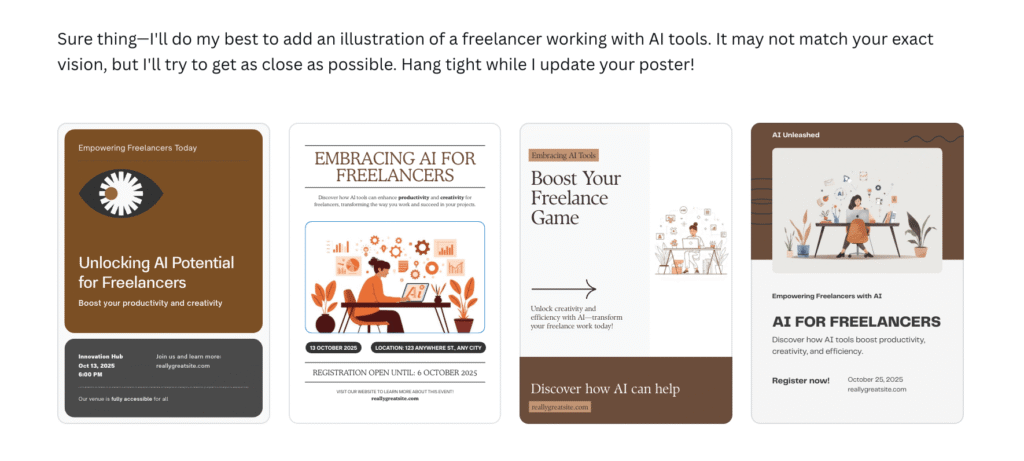
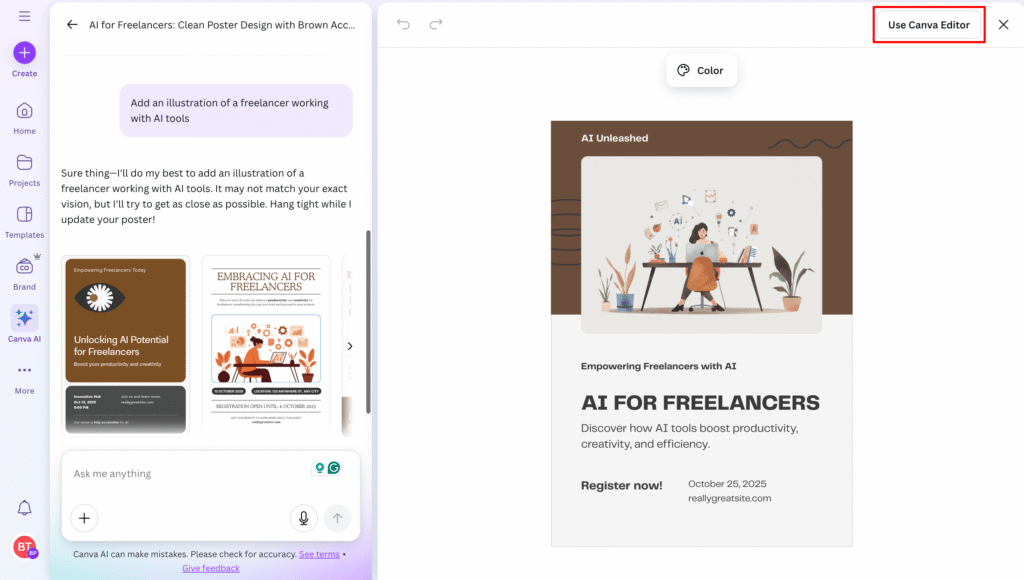
And don’t worry, you can still edit the design to add details, customize elements, remove text, and make some more improvements.

Just click “Use Canva Editor”
3. Create an Image

Okay, to be clear, this isn’t the same as #2: Magic Design.
Here, we are not asking for a design, but an ACTUAL image. A photo.

So, if you have an idea but can’t find any related images, you can ask Canva to create one for you.

Though this feature can be used in free accounts, it is limited.
If you need it often, you can try a pro account. But if not, the results in free accounts are already good.

AND ONE MORE THING:
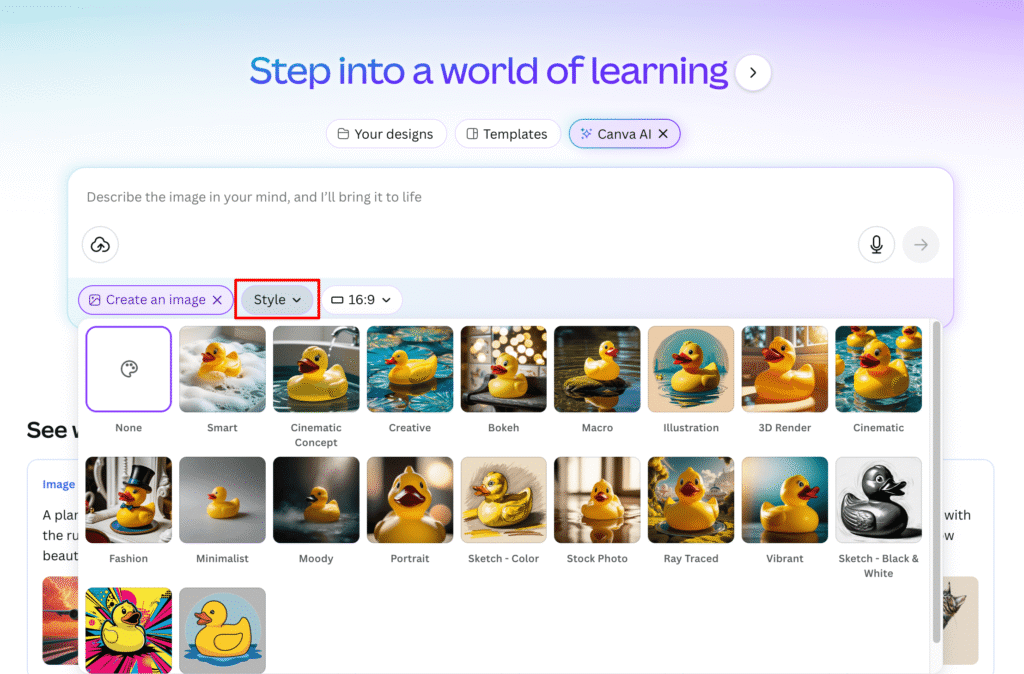
It’s not just a simple image generation. It can even generate in specific styles.
Yes, we can have a sketch, a vector, a pop art, and more!
FUN FACT: The brown desk background image you see in this blog’s featured photo?
It’s AI-generated (and yep, inside Canva!)

I simply asked for something like this:
“Create a clean home brown office vibe with a laptop that says: Canva AI Magic”
It’s amazing how AI can give me an image exactly as I wanted.

So, if you’re also like me, excited to maximize AI, stay tuned for our next blogs as we explore more AI tools!

Artificial Intelligence: Tips and Video Tutorials

▶︎ CREATE YOUR FREE ACCOUNT IN CANVA

TAGS:best Canva AI tools for freelancersCanva AI design tools for social media managersCanva AI featuresCanva AI for content creatorsCanva AI for freelancersCanva AI tools 2025Canva AI tools every freelancer should knowCanva AI updatesCanva Magic EditCanva Magic Edit and Magic Eraser explainedCanva Magic StudioCanva Magic Studio tutorialCanva Magic WriteCanva new features 2025Canva Text to Videohow to turn text into video using Canva AIhow to use Canva AI features for content creationlatest Canva AI features you need to trystep-by-step guide to Canva Magic Writetop Canva AI tools to boost productivity
Share

You May Also Like

August 19, 2025

3 Easy Ways to Set Your Rates as a Freelancer

December 26, 2025

3 Big Don’ts When Using AI as an Aspiring Online Freelancer

June 24, 2025

VA Basics: Time-Tracking 101

March 30, 2026

4 Popular AI Tools in 2026: Which One Freelancers Should Use?

Instagram

Hindi dahil 𝗵𝗶𝗻𝗱𝗶 𝗰𝗼𝗹𝗹𝗲𝗴𝗲 𝗴𝗿𝗮𝗱𝘂𝗮𝘁𝗲,
eh bawal na sa freelancing.

KNOW THIS, BOSS UP FAM:
💯 Clients care more about 𝗽𝗿𝗼𝗼𝗳 𝗼𝗳 𝘀𝗸𝗶𝗹𝗹𝘀 than your diploma

So, what to do instead?

💻 𝗕𝗨𝗜𝗟𝗗 𝗬𝗢𝗨𝗥 𝗣𝗢𝗥𝗧𝗙𝗢𝗟𝗜𝗢
Again, you don’t need experience dito.
Pwedeng sample works lang sa mga personal projects mo.

And your portfolio should match the service na i-ooffer mo.

For example, kung gusto mong maging 𝗦𝗼𝗰𝗶𝗮𝗹 𝗠𝗲𝗱𝗶𝗮 𝗠𝗮𝗻𝗮𝗴𝗲𝗿, build your own social media presence and document it.
☑︎ gumawa ka ng content (reels, graphics, text caption)
☑︎ i-manage mo yung page and grow it 
☑︎ gawan mo rin ng analytics report

If you want to be hired as a 𝗚𝗿𝗮𝗽𝗵𝗶𝗰 𝗗𝗲𝘀𝗶𝗴𝗻𝗲𝗿,
☑︎ gumawa ka ng sample designs (logos, posters, social posts)
☑︎ i-publish or i-compile mo in one place (Behance, Google Drive folder)
☑︎ share your design process and concepts

For aspiring 𝗩𝗶𝗿𝘁𝘂𝗮𝗹 𝗔𝘀𝘀𝗶𝘀𝘁𝗮𝗻𝘁𝘀,
☑︎ mag-set up ka ng task boards for different “mock clients” (Trello, Asana, etc.)
☑︎ take screenshots or record walkthroughs ng pag-practice nyo ng VA tools
☑︎ create a simple website with your service list

If you want more ideas and actual video tutorials on how to build your portfolio even with ZERO experience + no need for a college diploma

just comment “BUP-PORTFOLIO” and I’ll send you a FREE guide!
•
Follow
Hindi dahil 𝗵𝗶𝗻𝗱𝗶 𝗰𝗼𝗹𝗹𝗲𝗴𝗲 𝗴𝗿𝗮𝗱𝘂𝗮𝘁𝗲, eh bawal na sa freelancing. KNOW THIS, BOSS UP FAM: 💯 Clients care more about 𝗽𝗿𝗼𝗼𝗳 𝗼𝗳 𝘀𝗸𝗶𝗹𝗹𝘀 than your diploma So, what to do instead? 💻 𝗕𝗨𝗜𝗟𝗗 𝗬𝗢𝗨𝗥 𝗣𝗢𝗥𝗧𝗙𝗢𝗟𝗜𝗢 Again, you don’t need experience dito. Pwedeng sample works lang sa mga personal projects mo. And your portfolio should match the service na i-ooffer mo. For example, kung gusto mong maging 𝗦𝗼𝗰𝗶𝗮𝗹 𝗠𝗲𝗱𝗶𝗮 𝗠𝗮𝗻𝗮𝗴𝗲𝗿, build your own social media presence and document it. ☑︎ gumawa ka ng content (reels, graphics, text caption) ☑︎ i-manage mo yung page and grow it ☑︎ gawan mo rin ng analytics report If you want to be hired as a 𝗚𝗿𝗮𝗽𝗵𝗶𝗰 𝗗𝗲𝘀𝗶𝗴𝗻𝗲𝗿, ☑︎ gumawa ka ng sample designs (logos, posters, social posts) ☑︎ i-publish or i-compile mo in one place (Behance, Google Drive folder) ☑︎ share your design process and concepts For aspiring 𝗩𝗶𝗿𝘁𝘂𝗮𝗹 𝗔𝘀𝘀𝗶𝘀𝘁𝗮𝗻𝘁𝘀, ☑︎ mag-set up ka ng task boards for different “mock clients” (Trello, Asana, etc.) ☑︎ take screenshots or record walkthroughs ng pag-practice nyo ng VA tools ☑︎ create a simple website with your service list If you want more ideas and actual video tutorials on how to build your portfolio even with ZERO experience + no need for a college diploma just comment “BUP-PORTFOLIO” and I’ll send you a FREE guide!
2 weeks ago
View on Instagram |
1/6
Here’s a detailed 8-step beginner-friendly guide on how you can create your resume as an online freelancer, Boss Up Fam 💻 

#𝟭: 𝗚𝗼 𝘁𝗼 𝗖𝗮𝗻𝘃𝗮. 𝗦𝗲𝗮𝗿𝗰𝗵 𝗳𝗼𝗿 "𝗥𝗲𝘀𝘂𝗺𝗲" 𝗮𝗻𝗱 𝗽𝗶𝗰𝗸 𝗮 𝘁𝗲𝗺𝗽𝗹𝗮𝘁𝗲
Go for clean and simple templates.
Avoid overly colorful or cluttered ones, especially if you’re not applying for creative jobs.

#𝟮: 𝗔𝗱𝗱 𝘆𝗼𝘂𝗿 𝗽𝗵𝗼𝘁𝗼 & 𝗻𝗮𝗺𝗲
To make your name stand out from the rest of the resume text, use a slightly larger font, but don’t use decorative or hard-to-read fonts.

#𝟯: 𝗙𝗶𝗹𝗹 𝗶𝗻 𝘁𝗵𝗲 "𝗔𝗹𝗹 𝗔𝗯𝗼𝘂𝘁 𝗠𝗲" 𝘀𝗲𝗰𝘁𝗶𝗼𝗻
Write a one-liner pitch that answers: Who do you help? What service do you offer? What benefit do clients get from you?

#𝟰: 𝗔𝗱𝗱 𝘆𝗼𝘂𝗿 𝗰𝗼𝗻𝘁𝗮𝗰𝘁 𝗶𝗻𝗳𝗼
Include your Skype ID, email address, and your LinkedIn profile.

#𝟱: 𝗟𝗶𝘀𝘁 𝘆𝗼𝘂𝗿 𝗰𝗼𝗿𝗲 𝘀𝗸𝗶𝗹𝗹𝘀 & 𝘁𝗼𝗼𝗹𝘀
Highlight skills that are relevant to the job post and add any related tools or software you know how to use.

#𝟲: 𝗔𝗱𝗱 𝘄𝗼𝗿𝗸 𝗲𝘅𝗽𝗲𝗿𝗶𝗲𝗻𝗰𝗲
Include the client or company name, your role, and a few key responsibilities.
Keep it brief because in-depth details go in your CV, not here.

If you don’t have any experience yet working online, you can add your previous corporate job, especially if it’s related (e.g Admin Staff in the office = Virtual Assistant)

#𝟳: 𝗔𝗱𝗱 𝗽𝗼𝗿𝘁𝗳𝗼𝗹𝗶𝗼 𝗹𝗶𝗻𝗸𝘀 (𝘂𝘀𝗲 𝗕𝗶𝘁𝗹𝘆 𝘁𝗼 𝘀𝗵𝗼𝗿𝘁𝗲𝗻)

If you don’t have a landing page or freelance website yet, you can add your freelance social media pages where you post content about your skills and services.

You can also upload your sample works to a Google Drive folder, shorten the link using Bitly, and paste it into your resume.

#𝟴: 𝗗𝗼𝘄𝗻𝗹𝗼𝗮𝗱 𝘆𝗼𝘂𝗿 𝗿𝗲𝘀𝘂𝗺𝗲 𝗮𝘀 𝗣𝗗𝗙
Try to keep your resume to 1 page to make sure clients can quickly review it.

Happy client-hunting, Boss Up Fam!
Save this list or share to anyone who needs it 💻

If you want to watch the video version of this tutorial, I’ll add the link sa comment section!
•
Follow
Here’s a detailed 8-step beginner-friendly guide on how you can create your resume as an online freelancer, Boss Up Fam 💻 #𝟭: 𝗚𝗼 𝘁𝗼 𝗖𝗮𝗻𝘃𝗮. 𝗦𝗲𝗮𝗿𝗰𝗵 𝗳𝗼𝗿 "𝗥𝗲𝘀𝘂𝗺𝗲" 𝗮𝗻𝗱 𝗽𝗶𝗰𝗸 𝗮 𝘁𝗲𝗺𝗽𝗹𝗮𝘁𝗲 Go for clean and simple templates. Avoid overly colorful or cluttered ones, especially if you’re not applying for creative jobs. #𝟮: 𝗔𝗱𝗱 𝘆𝗼𝘂𝗿 𝗽𝗵𝗼𝘁𝗼 & 𝗻𝗮𝗺𝗲 To make your name stand out from the rest of the resume text, use a slightly larger font, but don’t use decorative or hard-to-read fonts. #𝟯: 𝗙𝗶𝗹𝗹 𝗶𝗻 𝘁𝗵𝗲 "𝗔𝗹𝗹 𝗔𝗯𝗼𝘂𝘁 𝗠𝗲" 𝘀𝗲𝗰𝘁𝗶𝗼𝗻 Write a one-liner pitch that answers: Who do you help? What service do you offer? What benefit do clients get from you? #𝟰: 𝗔𝗱𝗱 𝘆𝗼𝘂𝗿 𝗰𝗼𝗻𝘁𝗮𝗰𝘁 𝗶𝗻𝗳𝗼 Include your Skype ID, email address, and your LinkedIn profile. #𝟱: 𝗟𝗶𝘀𝘁 𝘆𝗼𝘂𝗿 𝗰𝗼𝗿𝗲 𝘀𝗸𝗶𝗹𝗹𝘀 & 𝘁𝗼𝗼𝗹𝘀 Highlight skills that are relevant to the job post and add any related tools or software you know how to use. #𝟲: 𝗔𝗱𝗱 𝘄𝗼𝗿𝗸 𝗲𝘅𝗽𝗲𝗿𝗶𝗲𝗻𝗰𝗲 Include the client or company name, your role, and a few key responsibilities. Keep it brief because in-depth details go in your CV, not here. If you don’t have any experience yet working online, you can add your previous corporate job, especially if it’s related (e.g Admin Staff in the office = Virtual Assistant) #𝟳: 𝗔𝗱𝗱 𝗽𝗼𝗿𝘁𝗳𝗼𝗹𝗶𝗼 𝗹𝗶𝗻𝗸𝘀 (𝘂𝘀𝗲 𝗕𝗶𝘁𝗹𝘆 𝘁𝗼 𝘀𝗵𝗼𝗿𝘁𝗲𝗻) If you don’t have a landing page or freelance website yet, you can add your freelance social media pages where you post content about your skills and services. You can also upload your sample works to a Google Drive folder, shorten the link using Bitly, and paste it into your resume. #𝟴: 𝗗𝗼𝘄𝗻𝗹𝗼𝗮𝗱 𝘆𝗼𝘂𝗿 𝗿𝗲𝘀𝘂𝗺𝗲 𝗮𝘀 𝗣𝗗𝗙 Try to keep your resume to 1 page to make sure clients can quickly review it. Happy client-hunting, Boss Up Fam! Save this list or share to anyone who needs it 💻 If you want to watch the video version of this tutorial, I’ll add the link sa comment section!
3 weeks ago
View on Instagram |
2/6
Did you know that you can ask Claude to summarize my video tutorial for you? 😉
Yep, I tried it!

Sooo if you’re a visual person na mas mabilis natututo pag may chart katulad netong nasa photo, feel free to try this too, Bosses!

🗒️ 𝗣𝗥𝗢𝗠𝗣𝗧:
I am a beginner freelancer and a visual learner. I will paste a YouTube video transcript below. Please summarize it into a visual, easy-to-understand key steps, important tips, and takeaways using cards, color-coded sections, or a step-by-step layout that is easy to follow at a glance.
Here is the transcript: [PASTE TRANSCRIPT HERE]

📌 𝗧𝗔𝗞𝗘 𝗡𝗢𝗧𝗘
Claude can't watch or transcribe videos from links.
So, it can’t fetch data from the link na i-papaste nyo.

𝗪𝗵𝗮𝘁 𝘆𝗼𝘂 𝗰𝗮𝗻 𝗱𝗼 𝗶𝘀:
1. Open the video on YouTube
2. Click "...more" under the title
3. Click "Show transcript"
4. Copy and paste it into Claude with the prompt above

Katulad ng ginawa natin in our video tutorial on how to repurpose a podcast into a blog.

If hindi nyo pa yun napapanood, I’ll just share the video sa comment section para meron din kayong reference.

And if you want the video version of this SMM Roadmap, I’ll also share it sa comment section 💬
•
Follow
Did you know that you can ask Claude to summarize my video tutorial for you? 😉 Yep, I tried it! Sooo if you’re a visual person na mas mabilis natututo pag may chart katulad netong nasa photo, feel free to try this too, Bosses! 🗒️ 𝗣𝗥𝗢𝗠𝗣𝗧: I am a beginner freelancer and a visual learner. I will paste a YouTube video transcript below. Please summarize it into a visual, easy-to-understand key steps, important tips, and takeaways using cards, color-coded sections, or a step-by-step layout that is easy to follow at a glance. Here is the transcript: [PASTE TRANSCRIPT HERE] 📌 𝗧𝗔𝗞𝗘 𝗡𝗢𝗧𝗘 Claude can't watch or transcribe videos from links. So, it can’t fetch data from the link na i-papaste nyo. 𝗪𝗵𝗮𝘁 𝘆𝗼𝘂 𝗰𝗮𝗻 𝗱𝗼 𝗶𝘀: 1. Open the video on YouTube 2. Click "...more" under the title 3. Click "Show transcript" 4. Copy and paste it into Claude with the prompt above Katulad ng ginawa natin in our video tutorial on how to repurpose a podcast into a blog. If hindi nyo pa yun napapanood, I’ll just share the video sa comment section para meron din kayong reference. And if you want the video version of this SMM Roadmap, I’ll also share it sa comment section 💬
4 weeks ago
View on Instagram |
3/6
5 hours of learning, lifetime earnings 🤑

If you have about 5 hours free this April,
you can binge-watch my 𝗦𝗠𝗠 𝗘-𝗖𝗢𝗨𝗥𝗦𝗘 𝗳𝗼𝗿 𝗙𝗥𝗘𝗘 📚

Pero syempre, as I always say:
𝗬𝗼𝘂 𝗻𝗲𝗲𝗱 𝘁𝗼 𝘁𝗮𝗸𝗲 𝗮𝗰𝘁𝗶𝗼𝗻 𝘁𝗼 𝗴𝗲𝘁 𝗿𝗲𝘀𝘂𝗹𝘁𝘀 💻

This free e-course is just the foundation.
But I hope that with this, you build a good career as a Social Media Manager 💃🕺🏻

🔗Just type "SMM e-course" para ma-send agad sayo yung course link!

Again, this is FREE.
If you see anyone asking for payment for these videos, please report dito sa page natin!

#SMMcourse #socialmediacourse #freeSMMtraining #socialmediamanagementtraining
•
Follow
5 hours of learning, lifetime earnings 🤑 If you have about 5 hours free this April, you can binge-watch my 𝗦𝗠𝗠 𝗘-𝗖𝗢𝗨𝗥𝗦𝗘 𝗳𝗼𝗿 𝗙𝗥𝗘𝗘 📚 Pero syempre, as I always say: 𝗬𝗼𝘂 𝗻𝗲𝗲𝗱 𝘁𝗼 𝘁𝗮𝗸𝗲 𝗮𝗰𝘁𝗶𝗼𝗻 𝘁𝗼 𝗴𝗲𝘁 𝗿𝗲𝘀𝘂𝗹𝘁𝘀 💻 This free e-course is just the foundation. But I hope that with this, you build a good career as a Social Media Manager 💃🕺🏻 🔗Just type "SMM e-course" para ma-send agad sayo yung course link! Again, this is FREE. If you see anyone asking for payment for these videos, please report dito sa page natin! #SMMcourse #socialmediacourse #freeSMMtraining #socialmediamanagementtraining
1 month ago
View on Instagram |
4/6
If you want to work online, you need to be familiar with Google apps like Drive, Docs, Slides, Sheets, and Forms.

Dahit eto yung mga tools na usually ginagamit ng clients and freelancers to collaborate, share files, and get things done efficiently.

Sa mga hindi pa nakakapanood, I can send you my FREE video tutorial so you can have an overview saan ginagamit etong mga tools na to.

Just comment “GOOGLE APPS” if you’re interested 👇
•
Follow
If you want to work online, you need to be familiar with Google apps like Drive, Docs, Slides, Sheets, and Forms. Dahit eto yung mga tools na usually ginagamit ng clients and freelancers to collaborate, share files, and get things done efficiently. Sa mga hindi pa nakakapanood, I can send you my FREE video tutorial so you can have an overview saan ginagamit etong mga tools na to. Just comment “GOOGLE APPS” if you’re interested 👇
2 months ago
View on Instagram |
5/6
Here's a list of AI tools you can explore for each specific task, Bosses!

Save the list 🔖

#aitools #aicontenttools #aiinfreelancing
•
Follow
Here's a list of AI tools you can explore for each specific task, Bosses! Save the list 🔖 #aitools #aicontenttools #aiinfreelancing
2 months ago
View on Instagram |
6/6
View on Instagram

Copyright © 2026 Bossed Up PH. All Rights Reserved.Site Powered by Pix & Hue.