

Claude 101 for Freelancers: How to Use Claude AI (Beginner Guide)
Whether you’re a freelancer juggling multiple clients, a social media manager writing captions in different brand voices, or a developer trying to build faster…
Claude has a mode built specifically for how you work.
In this guide, we’re breaking down everything: the three modes of Claude, how tokens and rate limits actually work, and the real-world tasks you can use Claude for.
What Is Claude (And Who Is Anthropic?)
So, Claude is an AI built by Anthropic.
Think of Anthropic as the company behind the scenes, and Claude as the product you use.
Understanding Claude’s Three Work Modes
Yes, this is where Claude starts to look really different from other AI tools. It operates in three modes, each designed for a different type of work.
#1 Chat Mode: Chatty
Chat is the mode most people are familiar with.
You ask something, Claude answers.
And this is where most beginners start.
It is available even on the free plan.
You can use Chat mode for:
- Email drafting
- Caption writing
- Research
#2 Cowork Mode: Task-Runner Admin
This is where things get really exciting.
While Chat answers our questions,
Cowork does the work for us.
But it requires the Claude desktop app (not just the web browser version), and it’s available only on Pro, Max, Team, or Enterprise plans.
Cowork mode can:
- Handle multi-step tasks
- Create structured documents
- Automate workflows across tools
#3 Code Mode: Techy
This is the most technical of the 3 modes,
built specifically for developers.
This also requires the Claude desktop app (not just the web browser version), and it’s available only on Pro, Max, Team, or Enterprise plans.
We can use Code mode for:
- Landing pages or Websites
- Script automation
- Debugging
- App prototypes
Understanding Tokens and Rate Limits
Think of tokens as the currency of Claude.
Every word you type and every word Claude responds with costs tokens.
A single word is roughly 1 to 2 tokens, a sentence is around 10 to 20 tokens, and a full page of text runs about 400 to 500 tokens.
The longer your chats, the more tokens you use.
Why This Matters for Your Workflow
Tokens accumulate within a single conversation.
Every message you send in a chat includes all the previous messages too. So by the time you’re on your third back-and-forth, Claude is processing all 3 exchanges together, not just your latest message.
PRO TIP:
Start a new chat whenever you’re switching to a different task.
If you asked Claude to write captions and now you need help with a client email, don’t continue on that same thread.
Which Model Should You Choose?
Claude has different models:
- Haiku is great for quick, surface-level answers.
Think of it as the fast-response option. It is very generous with tokens, so you’re less likely to hit your rate limit. - Sonnet is the sweet spot for most work, any tasks that require Claude to actually think.
It uses mid-range tokens, so you’ll hit your limit depending on how long your sentences are and how long Claude’s response is. - Opus is Claude’s most powerful model, the senior consultant of the lineup.
This is best for high-stakes analysis and complex projects.
As you hit your rate limit, there’s a 5-hour rolling window, a.k.a “our waiting game” before we can fully use the model again.
What I usually do is that once I hit my rate limit in one model, I switch to another model until the 5-hour window resets.
Actual Work Example
Now, here are some real examples of how Claude can handle our freelance work.
First, let’s try Claude Chat.
I can ask Claude to create an invoice for me just by using this prompt:
“I need to send an invoice to Client ABC Company for my social media management and research work. My rate for social media is $30/hour and I worked 20 hours over two weeks. For research, it’s $40/hour and 15 hours. Please create a Word document invoice and draft a professional, warm email I can send with it.”
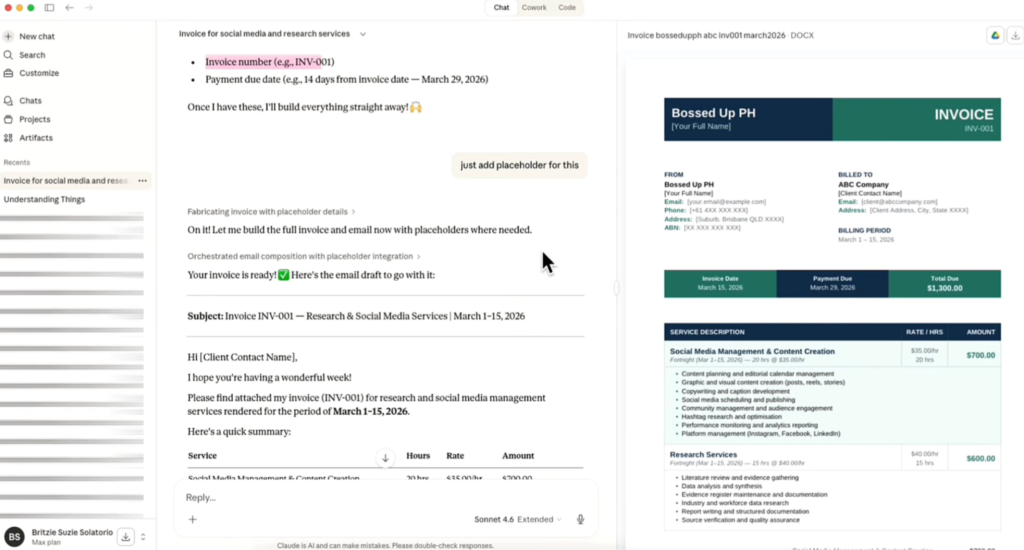
And what’s nice is that Claude asks clarifying questions (like whether to issue under your personal name or business name).
We can even upload our brand kit and ask Claude to match the invoice color to our branding.
Next, let’s try Claude Cowork.
For my social media management tasks, I do something like this:
- Upload a podcast audio or video file transcript
- Ask Claude to write a blog post
- Request social media captions, video titles, and tags from the same content
- Get a ready-to-review document dropped into our project management tool

Should You Upgrade to Claude Pro or Max?
The free tier of Claude is already a good starting point, Bosses.
But it’s actually very limited, especially if you need to use it often.
Personally, I find it very useful, which is why I subscribed to Max.
You can try Pro first, and then, as your tasks start to require more tokens, you can upgrade to Max.
Migrating Your ChatGPT History to Claude
If you’ve already been using ChatGPT and don’t want to start from scratch, don’t worry, because Claude has a built-in memory import feature that lets you bring your conversation history and context over.
- Go to Settings → Manage Memory → Import
- And then, just follow the prompts.
You in the Loop!
Of course, as I always say, never send AI output directly to a client, Bosses!
Double-check and ensure it is aligned with the client’s branding.
If you want a quick Claude guide, I have a free downloadable file you can check out.